Choosing between Zotero vs Mendeley vs EndNote can feel like a minor software decision until your thesis contains 300 references, your systematic review requires meticulous source tracking, or a journal asks you to switch from APA to Vancouver two days before submission.
A reference manager is more than a digital bibliography. It is the infrastructure behind your citation library, PDF workflow, literature-review process, and manuscript submission workflow. The wrong choice can create duplicate records, inconsistent metadata, storage limitations, broken Word citations, or a painful migration halfway through a PhD.
The good news: you do not need the “most powerful” tool. You need the best reference manager for your research workflow.
In this Zotero vs Mendeley vs EndNote 2026 comparison, we examine cost, reference-library storage, PDF annotation, Microsoft Word and Google Docs integration, LaTeX workflows, citation styles, collaboration, systematic reviews, medical writing, and long-term library management.
💡 Need expert help with your paper?
Transform your manuscript with ManuscriptLab’s professional editing & formatting services!
Zotero vs Mendeley vs EndNote: Quick Comparison
Before examining individual features, use this table to identify the strongest fit for your workflow.
| Criterion | Zotero | Mendeley | EndNote |
| Basic software cost | Free | Free tier available | Paid commercial software |
| Free cloud file storage | 300 MB | 2 GB | Depends on plan/institution |
| Paid storage | 2 GB, 6 GB, or unlimited | 5 GB, 10 GB, or unlimited plans | Depends on license |
| Microsoft Word | Yes | Yes, via Mendeley Cite | Yes, via Cite While You Write |
| Google Docs | Yes | Limited compared with Zotero | Supported through EndNote workflows |
| LibreOffice | Yes | Not its strongest workflow | Supported through available workflows |
| PDF reading/annotation | Excellent | Excellent | Strong |
| Citation styles | Very large CSL ecosystem | Large style collection | Thousands of styles |
| LaTeX | Strong through BibTeX/BibLaTeX workflows | Possible, but less central | Strong BibTeX workflows |
| Collaboration | Strong group libraries | Strong cloud-oriented collaboration | Strong institutional/team features |
| Best for | Most students, researchers, interdisciplinary work | Word-centric researchers and PDF workflows | Advanced/institutional research workflows |
| Main consideration | Cloud file storage is paid beyond 300 MB | Proprietary ecosystem and plan limits | Cost and learning curve |
Zotero currently provides 300 MB of free file storage, with paid tiers of 2 GB, 6 GB, and unlimited storage. Mendeley offers a free plan with 2 GB of storage and paid plans with larger capacities.
Bottom line: For most PhD students and independent researchers, Zotero is the strongest overall choice. Mendeley remains attractive for researchers who prioritize its Word-centered workflow and integrated PDF environment. EndNote is particularly compelling when a university, hospital, research institute, or laboratory already provides institutional access—or when advanced reference-management capabilities justify its commercial license.
1. What Should You Look for in Reference Management Software?
A reference manager stores bibliographic records and helps researchers collect, organize, cite, annotate, and retrieve scholarly sources.
At minimum, evaluate five capabilities:
- Reference capture — How easily can you import journal articles, books, websites, datasets, and other sources?
- Metadata accuracy — Can the software identify DOI, authors, journal title, volume, issue, pages, and publication year correctly?
- Citation integration — Can you insert citations directly into Word, Google Docs, or your preferred writing environment?
- PDF management — Can you store, search, highlight, annotate, and retrieve full-text articles?
- Portability and collaboration — Can you synchronize your library, share collections, and migrate your references later?
The industry-standard metric here is not the number of buttons a reference manager offers. It is workflow reliability: how consistently the software preserves accurate metadata from literature discovery through final manuscript submission.
This matters because authors remain responsible for citation accuracy. The ICMJE recommends verifying references against bibliographic sources such as PubMed or the original publication and checking that cited references support the statements associated with them.
Common pitfall: assuming automatic citation means automatic accuracy
It does not.
A reference manager can format a malformed DOI perfectly. It cannot necessarily determine that the DOI belongs to the wrong article.
Rule: Automate formatting, but manually audit bibliographic accuracy.
2. Zotero: Best Reference Manager for Most Researchers
Zotero has become a leading option for researchers who want a flexible, relatively open research-management ecosystem without purchasing a commercial license.
Its greatest advantage is breadth. Zotero works with Microsoft Word, LibreOffice, and Google Docs, while its browser connectors make capturing sources from the web straightforward.
Explore Zotero’s official documentation
Why Zotero works well for academic writing
Zotero uses Citation Style Language (CSL) and supports major styles such as APA, Chicago, MLA, and Vancouver, alongside thousands of journal- and publisher-specific styles.
That makes it particularly useful when your research moves between:
- university thesis requirements,
- conference papers,
- journal submissions,
- grant applications, and
- book chapters.
Zotero can also automatically update a bibliography when citations change in your document. Its Google Docs integration allows researchers to search their library, insert citations, add page information, and generate a bibliography without manually rebuilding the reference list.
Zotero vs Mendeley PDF annotation
Zotero has a particularly strong PDF workflow. Its built-in reader supports highlights and underlining, while annotations can be converted into notes containing links back to the relevant PDF pages.
This creates an important literature-review workflow:
Read → annotate → extract insight → connect to source → cite while writing.
Zotero stores its own PDF annotations in its database rather than directly inside the PDF, enabling synchronization and reducing certain file-conflict problems. Researchers can subsequently export PDFs with annotations embedded.
Zotero storage: the major limitation
Zotero’s free software does not mean unlimited free cloud storage.
The current individual storage structure is:
- 300 MB: free
- 2 GB: $20/year
- 6 GB: $60/year
- Unlimited: $120/year
These plans apply to Zotero’s synchronized file storage.
For a text-heavy humanities project with relatively few PDFs, 300 MB may be adequate. For a laboratory researcher maintaining thousands of full-text PDFs, storage planning becomes important.
Common Zotero pitfall
Do not treat the reference record and the PDF as the same thing.
Your citation metadata may be perfectly synchronized while your attachments consume substantially more storage.
Best practice: periodically remove duplicate PDFs, verify attachment links, and establish a backup strategy before beginning a major thesis or systematic review.
Also read: 10 Key Reasons Manuscripts Get Rejected Before Peer Review
3. Mendeley: Is Mendeley Still Good for Research Papers?
Yes but its strengths are different from Zotero’s.
Mendeley Reference Manager combines reference organization with PDF reading, highlighting, annotation, and a cloud-based workflow. Mendeley describes the current Reference Manager as a free web and desktop application for storing, organizing, and searching references.
Explore Mendeley Reference Manager
Mendeley vs Zotero for PDF annotation
Mendeley remains attractive to researchers whose workflow begins with PDFs.
The current Mendeley Reference Manager supports:
- PDF highlighting,
- annotations,
- comments,
- reference organization,
- library search, and
- collaboration.
Its Mendeley Notebook is designed to consolidate thoughts across documents.
For researchers conducting intensive literature reviews, this can make Mendeley feel natural: import articles, read them, annotate them, organize them, and cite them later.
Mendeley and Microsoft Word
Mendeley’s citation workflow is centered strongly on Mendeley Cite, its Microsoft Word add-in.
Researchers can search their Mendeley library, insert individual or multiple references, generate bibliographies, and change citation styles directly from Word. Mendeley Cite is compatible with Microsoft Word 2016 and newer, Microsoft 365, Word Online, and the Word app for iPad.
This makes Mendeley particularly practical for researchers whose entire writing process revolves around Microsoft Word.
Mendeley cost and storage
Mendeley’s free plan currently includes 2 GB of storage. Paid plans increase that capacity:
- Plus: 5 GB
- Pro: 10 GB
- Max: unlimited
Current listed prices are $4.99/month or $55/year for Plus, $9.99/month or $110/year for Pro, and $14.99/month or $165/year for Max.
That means Mendeley offers substantially more free cloud storage than Zotero’s 300 MB allowance.
Common Mendeley pitfall
Do not choose Mendeley solely because it offers more free storage.
Your decision should account for platform dependence, citation requirements, collaboration, export options, and your preferred writing environment.
If your university department already has a Mendeley-centered workflow, that may outweigh differences in storage. Conversely, if you expect to move between Google Docs, LibreOffice, Word, LaTeX, and multiple research environments, Zotero’s broader integration can be more attractive.
4. EndNote: The Advanced Commercial Option
EndNote has long occupied a different position in the reference-management market.
Rather than focusing primarily on being a lightweight, accessible research organizer, EndNote provides a highly developed reference database and manuscript-production environment with extensive customization.
Explore EndNote’s official documentation
EndNote vs Zotero for researchers
EndNote is particularly relevant when:
- your institution provides an EndNote license;
- your research group already uses EndNote;
- you work with complex bibliographic requirements;
- you need sophisticated reference-library organization;
- your workflow is heavily based on Microsoft Word; or
- you work with large, established institutional libraries.
Its Cite While You Write (CWYW) system integrates with Microsoft Word and can automatically format citations and bibliographies as you write. EndNote’s current documentation also describes thousands of available styles and its Traveling Library functionality, which embeds reference information within Word documents.
EndNote and Word
For researchers who live in Microsoft Word, EndNote is exceptionally mature.
The CWYW workflow allows you to:
- open your EndNote library;
- position your cursor in Word;
- search for a reference;
- insert it;
- automatically format the citation; and
- update the bibliography as references change.
EndNote’s current documentation supports Word versions including 2016, 2019, 2021, and Microsoft 365 for its current CWYW workflow.
The cost question
This is where EndNote vs Zotero cost and pricing becomes significant.
Zotero can be used without purchasing the reference-management software itself. EndNote is commercial software, although institutional licenses can substantially change the economics for students and researchers.
Therefore, check your university library before buying EndNote.
A researcher with free institutional access may reasonably select EndNote over Zotero. An independent PhD student paying personally may find Zotero’s free software considerably easier to justify.
Common EndNote pitfall: field-code dependence
EndNote’s Word integration uses field codes to manage dynamic citations. Those codes enable reformatting but can cause problems if documents are opened and saved through incompatible word processors.
EndNote specifically warns that saving a formatted document in an incompatible word processor can remove the field codes and prevent EndNote from reformatting the citations.
Best practice: keep an untouched master copy of your dynamically formatted manuscript before converting citations to plain text or sending files through external production workflows.
5. Zotero vs Mendeley vs EndNote for Thesis Writing
A PhD thesis creates different requirements from a 2,000-word journal article.
You may accumulate hundreds or thousands of sources over several years. You may also change supervisors, collaborate with co-authors, move between institutions, or submit different chapters to different journals.
For Mendeley vs Zotero vs EndNote for thesis writing, prioritize these metrics:
Library scalability
Your reference manager should handle:
- multiple collections;
- nested folders or equivalent organization;
- tags;
- saved searches;
- duplicate detection;
- attachments;
- notes; and
- metadata correction.
Citation-style flexibility
A thesis may use one institutional style, while a subsequent journal manuscript requires another.
Zotero is particularly strong here because its CSL ecosystem supports thousands of styles and allows global style switching.
Migration
A thesis is a long-term research asset. Avoid building a library that becomes impossible to export.
Maintain periodic exports in standard bibliographic formats such as RIS, BibTeX, or BibLaTeX, depending on your workflow.
Collaboration
If several authors are working on the same manuscript, assess not just whether references can be shared but whether PDF attachments, annotations, and metadata changes can be synchronized without creating conflicts.
6. Which Citation Manager Is Best for Word and LaTeX?
There is no universal winner.
Best for Microsoft Word
EndNote is arguably the strongest choice for advanced Word-centric workflows, particularly when institutional access is available.
Zotero is the better choice for researchers who want a simpler and flexible Word workflow.
Mendeley is also strong for Word users through Mendeley Cite.
Best for Google Docs
Zotero has the clearest advantage among these three because its Google Docs integration is directly supported and allows dynamic citation and bibliography management.
Best for LaTeX
For LaTeX users, the crucial requirement is reliable BibTeX/BibLaTeX export and metadata quality, rather than a Word-style citation plugin.
Zotero is particularly attractive because LaTeX-oriented workflows can use exported bibliographic databases and community integrations.
Recommendation: If your research workflow alternates between LaTeX and Word, Zotero is generally the safer all-purpose choice.
Also read: ManuscriptLab Editing Services for Publication-Ready Academic Papers
7. Which Citation Manager Is Best for Literature Reviews and Systematic Reviews?
For a conventional literature review, choose the tool that minimizes friction during
search → import → deduplicate → annotate → synthesize → cite.
Zotero is a strong default because its browser capture, collections, tags, PDF reader, notes, and citation plugins fit this workflow closely.
Mendeley is also effective when PDF reading and annotation are central.
EndNote becomes particularly attractive for large, structured research programs and institutions where researchers already share established EndNote libraries.
However, a reference manager does not replace a systematic-review methodology.
For systematic reviews, maintain a separate screening and study-selection process according to the relevant protocol and reporting standard. The ICMJE notes that systematic reviews should describe methods for locating, selecting, extracting, and synthesizing evidence.
Your citation manager is the bibliographic infrastructure, not the systematic-review methodology itself.
8. Best Citation Software for Medical Writing
Medical authors have an additional reason to take reference management seriously: citation errors can undermine the credibility and reproducibility of a manuscript.
The ICMJE recommends citing original research where possible, verifying references against authoritative bibliographic sources, and checking for retracted articles. For MEDLINE-indexed articles, PubMed is identified as the authoritative source for information about retractions.
Review the current ICMJE Recommendations
For medical writing:
Choose Zotero if: you want a flexible, low-cost system that works across multiple writing environments.
Choose Mendeley if: PDF reading, annotation, cloud storage, and Microsoft Word are central to your workflow.
Choose EndNote if: your hospital, university, laboratory, or research group already licenses it and your workflow depends heavily on Word.
Do not assume that the reference manager will automatically make your paper ICMJE-compliant. Journal-specific Instructions for Authors remain decisive, and the ICMJE explicitly advises authors to use its recommendations alongside individual journal requirements.
9. Why Do Researchers Switch From Mendeley to Zotero?
The question “why switch from Mendeley to Zotero?” usually comes down to workflow rather than a single missing feature.
Common reasons include:
1. Greater cross-platform flexibility
Zotero supports Word, LibreOffice, and Google Docs through official integrations.
2. Strong browser-based source capture
Zotero’s browser connector makes collecting bibliographic records from research databases and websites an integral part of the workflow.
3. Extensive citation-style ecosystem
Researchers frequently move between institutional and journal styles. Zotero’s CSL-based system is built for this kind of flexibility.
4. Data portability
Zotero emphasizes data portability and provides mechanisms for exporting libraries and annotated PDFs rather than locking research notes permanently into a proprietary environment.
5. Open-source orientation
Zotero is developed as a nonprofit project by Digital Scholar and a broader community, which can appeal to researchers concerned about long-term control of their research infrastructure.
That does not mean everyone should migrate.
If Mendeley already works reliably for your research group, switching purely because Zotero is popular may introduce unnecessary migration risk.
10. How to Choose the Best Reference Manager for Your Research
Use this decision framework.
Choose Zotero if you:
- are a PhD student or independent researcher;
- need a free reference-management application;
- use Word, Google Docs, or LibreOffice;
- work across disciplines;
- frequently change citation styles;
- conduct literature reviews;
- want strong PDF annotation;
- value data portability.
Choose Mendeley if you:
- work primarily in Microsoft Word;
- prefer an integrated PDF reading environment;
- want more free cloud storage;
- collaborate within an established Mendeley ecosystem;
- already have a large, functional Mendeley library.
Choose EndNote if you:
- have institutional access;
- work in a research-intensive laboratory or hospital;
- maintain a large established reference library;
- need advanced Word-based workflows;
- require sophisticated reference-management features;
- are comfortable with commercial software.
The simplest decision rule
Starting from scratch? Choose Zotero.
Already invested heavily in Mendeley? Stay unless you have a specific reason to migrate.
Your institution provides EndNote? Try EndNote before paying for another tool.
Reference Manager Decision Matrix
| Research scenario | Recommended choice | Why |
| Undergraduate research | Zotero | Free and easy to scale |
| Master’s thesis | Zotero | Strong Word/Google Docs workflow |
| PhD dissertation | Zotero or EndNote | Depends on institutional ecosystem |
| Systematic literature review | Zotero or EndNote | Strong organization and citation control |
| PDF-heavy literature review | Zotero or Mendeley | Strong annotation workflows |
| Medical manuscript | Zotero or EndNote | Strong citation-style support |
| Word-centric research group | EndNote or Mendeley | Mature Word integration |
| Google Docs researcher | Zotero | Direct integration |
| LaTeX researcher | Zotero | Strong bibliographic export ecosystem |
| Institution with EndNote license | EndNote | Reduces licensing cost |
| Independent researcher on a budget | Zotero | Free software with optional paid storage |
| Large cloud PDF collection | Mendeley or paid Zotero | More generous included storage options |
11. Reference Management Is Only Half the Job
Installing Zotero, Mendeley, or EndNote does not guarantee a publication-ready manuscript.
Before submission, audit the actual citations.
Check:
- author names;
- publication year;
- article title;
- journal title;
- volume and issue;
- page range or article number;
- DOI;
- URL where required;
- capitalization;
- citation order;
- in-text/reference-list consistency;
- duplicate references;
- retracted articles;
- missing references;
- references cited in the bibliography but never cited in the manuscript.
This final audit is especially important in medical and scientific publishing. ICMJE guidance states that authors are responsible for accurate references and should be able to attest that cited references support the associated claims.
Reference managers automate bibliographic formatting. They do not replace scholarly judgment.
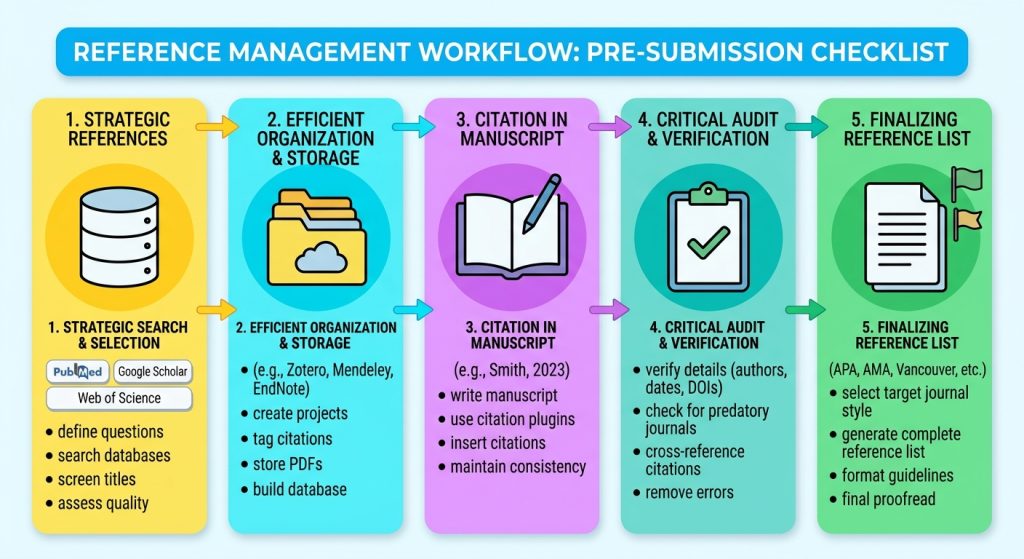
Pre-Submission Reference Management Checklist
Before submitting your paper, thesis, or systematic review:
- Select one reference manager and establish a consistent workflow.
- Create logical collections or folders before your library becomes unwieldy.
- Remove duplicate references.
- Verify DOI and bibliographic metadata against authoritative sources.
- Attach PDFs consistently.
- Review PDF annotations and research notes.
- Confirm the required journal citation style.
- Update all citations and bibliographies before submission.
- Check that every in-text citation appears in the reference list.
- Check that every reference-list entry is cited where required.
- Verify page numbers for quotations or pinpoint citations.
- Check for retracted or corrected articles where relevant.
- Export a backup of your reference library.
- Preserve an untouched master copy of your manuscript.
- Remove or preserve field codes according to the journal’s submission requirements.
- Perform a final manual reference audit.
Conclusion: Is Zotero Better Than EndNote?
For most researchers in 2026, Zotero is the best overall reference manager because it combines a free core application, broad word-processor integration, strong PDF annotation, extensive citation-style support, and a flexible research workflow.
But “best” depends on context.
Mendeley remains a capable choice for Word-focused, PDF-heavy workflows, particularly for researchers who value its cloud storage and integrated reading environment. EndNote remains highly competitive for advanced users and institutional research environments, especially when an organization already provides a license.
The most important decision is therefore not Zotero vs Mendeley vs EndNote in isolation. It is whether your chosen tool can reliably support your entire research lifecycle from literature discovery and PDF annotation to citation insertion, bibliography generation, reference auditing, and final journal submission.
Choose the platform that minimizes friction, preserves your research data, and fits the publication workflow you actually use.
And once the references are under control, make sure the manuscript itself meets the journal’s editorial, formatting, reporting, and language requirements.
Get professional academic editing and formatting support from ManuscriptLab