Submitting an academic paper without knowing how it may be evaluated for AI-generated writing can create unnecessary anxiety. Many students and researchers want to know: Can I check my paper on Turnitin for AI content before turning it in? The answer depends on your institution’s Turnitin configuration, the products it licenses, and whether you have access to Draft Coach or an instructor-facing Turnitin account.
Turnitin’s AI Writing Detection and Similarity Report are not the same thing. A Similarity Report identifies text that matches material in Turnitin’s databases, while the AI Writing Report estimates how much qualifying text may have been generated or modified by AI writing tools. Turnitin itself cautions that AI detection should be interpreted as one piece of evidence rather than a definitive determination of academic misconduct.
This guide explains how to perform a legitimate pre-submission Turnitin check, what Turnitin Draft Coach can and cannot do, how resubmissions work, and what to do if your institution does not provide access to an AI Writing Report.
💡 Need expert help with your paper?
Transform your manuscript with ManuscriptLab’s professional editing & formatting services!
Can You Check a Paper on Turnitin for AI Content Before Submitting?
Sometimes but not through every Turnitin student account.
The most important distinction is between Turnitin Draft Coach and the full Turnitin AI Writing Report.
Turnitin Draft Coach is designed as a formative writing tool. When enabled by an institution, students can use it inside Google Docs or Microsoft Word Online to check similarity, citations, and grammar while developing a draft. Turnitin describes Draft Coach as a way to identify potential problems before final submission.
However, access to Turnitin’s AI Writing Detection is controlled by the products and licenses an institution has enabled. Turnitin states that AI detection is available through certain Turnitin products and configurations, rather than being an unrestricted public checker available to every student.
Therefore, do not assume that:
Turnitin account → upload draft → automatically receive AI score
is a universal workflow.
Your institution may allow you to run a Similarity Report but not view an AI Writing Report during drafting.
Turnitin checks compared
| Turnitin feature | Main purpose | Pre-submission availability | What it tells you |
| Similarity Report | Identify matching text | Often available through Draft Coach | Where wording overlaps with sources |
| Citation Check | Review citation/reference relationships | Available through Draft Coach where enabled | Potential missing or mismatched citations |
| Grammar Guide | Identify grammar issues | Available through Draft Coach where enabled | Potential language problems |
| AI Writing Report | Identify text likely generated or altered by AI | Depends on institutional product/access | Percentage and locations of qualifying text |
| Writing Report | Provide additional writing-process insights | Primarily instructor-facing | Information about the writing process |
The practical implication is simple: a Similarity Report is not an AI detection report.
1. Check Whether Your Institution Provides Turnitin Draft Coach
The first step is to determine whether your university, school, or research institution has enabled Turnitin Draft Coach.
Draft Coach is available as an add-on in Google Docs or Microsoft Word Online, provided the institution has configured the service. Turnitin’s current documentation states that it is not available in the desktop version of Microsoft Word.
How to check
Open the document you are using for your assignment or manuscript and look for the Turnitin Draft Coach integration.
If your institution has enabled it, you may be able to run:
- Similarity Check
- Citation Check
- Grammar Guide
The exact interface can vary according to institutional configuration.
If Draft Coach is missing, contact your instructor, library, writing center, or institutional Turnitin administrator rather than attempting to create an unofficial Turnitin account.
Why institutional access matters
Turnitin is primarily an institutional academic-integrity platform. Access, licensing, repositories, report visibility, and enabled features can differ between organizations.
A common mistake is assuming that a personal Turnitin account will provide the same reports available to an instructor.
It may not.
2. Use Draft Coach for a Legitimate Pre-Submission Check
If Draft Coach is available, it can be useful before you submit the final version.
Turnitin describes Draft Coach as a formative tool that helps students identify accidental plagiarism, citation problems, and grammar issues during writing.
What Draft Coach can help you identify
Similarity problems:
You can inspect passages that resemble material in Turnitin’s repositories.
Citation problems:
The Citation Check can help identify relationships between citations and references.
Grammar problems:
Grammar Guide can flag potential grammatical issues.
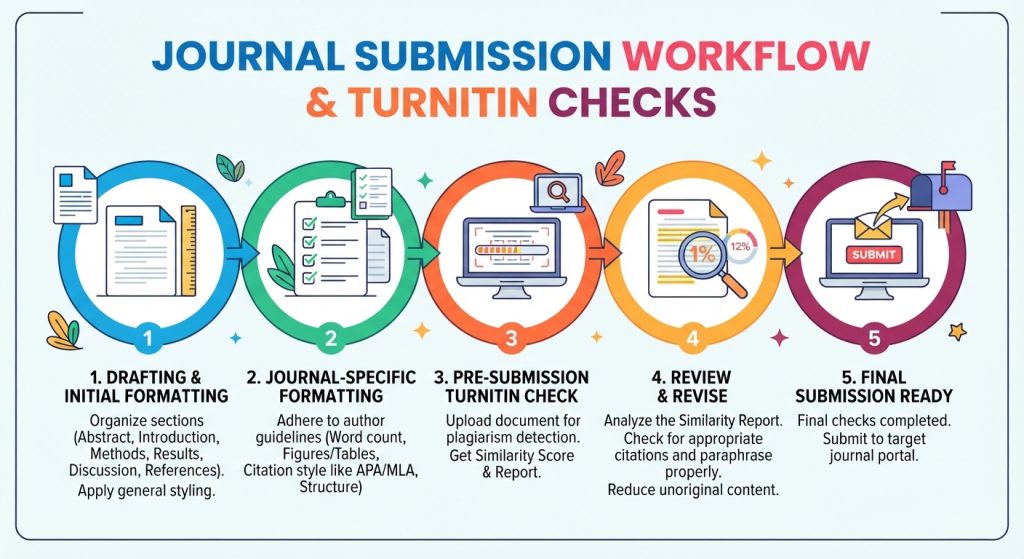
This creates a useful pre-submission workflow:
Draft → Draft Coach → Review matches → Correct citations/paraphrasing → Edit → Final submission
Important limitation: Draft Coach is not automatically an AI detector
Turnitin’s current Draft Coach documentation describes Similarity Check, Citation Check, and Grammar Guide as its core student-facing reports. It should therefore not be treated as a guaranteed method for obtaining the same AI Writing Report an instructor may see in Turnitin Feedback Studio.
3. Understand the Difference Between Similarity and AI Detection
This distinction is essential before interpreting any Turnitin result.
A Similarity score answers a question broadly related to:
Which portions of this document resemble material already present in Turnitin’s searchable sources?
An AI Writing score addresses a different question:
How much qualifying text does Turnitin’s AI model identify as likely generated by an AI writing tool or modified using certain AI-based tools?
These measurements should never be treated as interchangeable.
For example, a paper could have:
- High similarity but little or no AI-detected writing, because it contains properly cited quotations or closely matching source material.
- Low similarity but substantial AI-detected writing, because original AI-generated wording may not match existing sources.
- Both high similarity and AI-detected text.
- Neither, depending on the document and the underlying databases and detection models.
This is why checking only the Similarity percentage cannot tell you whether Turnitin will identify writing as AI-generated.
Also read: 10 Key Reasons Manuscripts Get Rejected Before Peer Review
4. If You Have Access to the AI Writing Report, Know What the Score Means
Turnitin’s AI Writing Report provides an overall percentage representing the proportion of qualifying text that its model identifies as likely AI-generated or otherwise qualifying under its detection criteria. The report can also highlight relevant sections of the submission. But the number requires careful interpretation.
A score is not equivalent to a probability that the student cheated.
Turnitin explicitly states that AI detection should not be used as the sole basis for determining academic misconduct. Human judgment and institutional policy remain essential.
The 20% threshold matters
Turnitin’s current documentation states that AI detection results between 1% and 19% are not surfaced as a numerical percentage. Instead, the report uses an asterisk to indicate a result below the 20% threshold because of the greater possibility of false positives at lower levels.
For qualifying submissions above that threshold, the report can display a percentage and corresponding highlights.
This means you should not interpret:
“19% AI”
as equivalent to:
“Turnitin has confirmed that 19% of my paper was written by AI.”
That interpretation is technically incorrect.
5. Do Not Try to “Lower the Turnitin AI Score” by Manipulating the Text
If your concern is an AI detection result, the appropriate response is not to run your paper through an AI paraphraser, “humanizer,” or rewriting tool designed to circumvent detection.
That approach creates two problems.
First, it can change the meaning, terminology, citations, and technical accuracy of your work.
Second, Turnitin’s current AI Writing Report includes detection capabilities related to certain AI-paraphrased or AI-altered text in supported contexts.
For academic writing, the better objective is documented authorship and defensible scholarly practice, not a particular detector score.
Instead, preserve evidence of your writing process
Maintain:
- Earlier drafts
- Research notes
- Literature-search records
- Reference-manager libraries
- Version history
- Data-analysis files
- Figures and source datasets
- Supervisor feedback
- Track Changes records
- Laboratory or field notes where applicable
These materials can demonstrate how the manuscript developed over time.
For researchers, this documentation is especially valuable because legitimate academic writing often involves extensive editing, collaboration, language polishing, and revision.
6. What Happens If You Resubmit Your Draft Multiple Times?
Repeated submissions can create confusion, particularly when students assume every Turnitin submission is treated identically.
The exact behavior depends on the assignment settings configured by the instructor or institution.
With Draft Coach, Turnitin currently states that students have three Similarity Reports available for a draft, allowing them to review matches and revise their work.
That is different from repeatedly submitting a final assignment to an instructor-controlled Turnitin assignment.
Why resubmission rules matter
Institutional assignments can have:
- Multiple submission attempts
- Different due-date settings
- Repository options
- Resubmission restrictions
- Processing delays
- Instructor-controlled visibility
Do not repeatedly upload a final manuscript simply to see whether its score changes.
Instead, use the pre-submission tools your institution provides and follow the assignment’s submission instructions.
Draft Coach has an important advantage
Turnitin states that Draft Coach does not submit papers to the Turnitin repository or an institution’s private repository. This means a student can use the tool during drafting without creating a self-match against the final submission in the same way a repository submission could.
That makes Draft Coach particularly useful for legitimate pre-submission checking.
7. Can You Get the AI Report Without Submitting to Your Instructor?
This is where many online guides become misleading.
There is no universal method that allows every student to obtain the exact instructor-facing Turnitin AI Writing Report independently.
Your ability to see an AI report depends on your institution’s Turnitin products, licensing, permissions, and workflow.
Turnitin’s AI Writing Detection is available in specified Turnitin products and configurations, while Draft Coach is separately designed as a student-facing formative tool.
Therefore, if your Draft Coach panel gives you Similarity, Citation, and Grammar tools but no AI Writing option, that does not mean your paper has a particular AI score.
It means the AI report is not being exposed through that particular student workflow.
What should you do?
Ask your instructor or institution:
“Does our Turnitin configuration provide students with access to the AI Writing Report before final submission?”
This is more reliable than purchasing an unrelated third-party “Turnitin checker.”
8. What If You Cannot Access a Turnitin AI Report?
You can still perform a rigorous pre-submission integrity audit.
Audit your sources
Check every citation against the original publication.
Confirm:
- Author names
- Publication year
- Article title
- Journal title
- DOI
- Volume and issue
- Page range or article number
For biomedical research, cross-check your manuscript against relevant ICMJE recommendations and the journal’s author instructions.
Audit paraphrases
Do not simply replace words from a source with synonyms.
A strong academic paraphrase changes the sentence structure while accurately preserving the source’s meaning and clearly attributing the underlying idea.
Audit quotations
Every quotation should be:
- Necessary
- Accurately reproduced
- Properly cited
- Formatted according to the required style
Audit references
Use the target journal’s required reference style rather than assuming that APA, MLA, Vancouver, or another style is universally acceptable.
For broader publication ethics guidance, consult the Committee on Publication Ethics (COPE).
9. Use Your Own Writing Evidence as an Integrity Safeguard
AI detection is only one part of an academic-integrity review.
A stronger strategy is to make the authorship of your work transparent.
For a thesis, dissertation, journal article, or research report, keep a structured manuscript history.
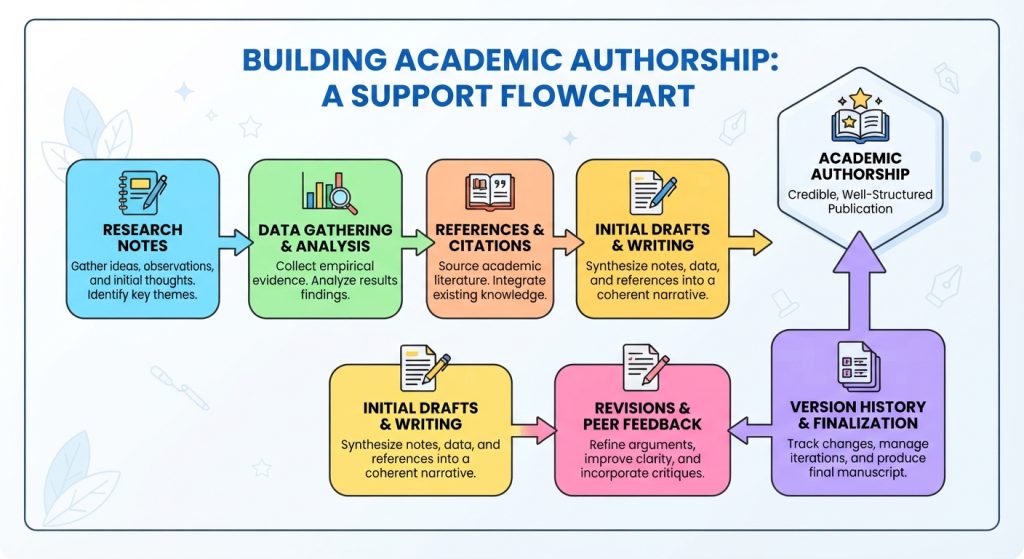
A useful evidence trail looks like this:
Research question → Literature search → Notes → Outline → First draft → Supervisor feedback → Revision → Final manuscript
This process is more academically defensible than attempting to engineer a particular detector result.
Turnitin itself emphasizes that AI detection is intended to support educator judgment rather than independently establish misconduct.
Also read: Manuscript Editing and Formatting Services
10. Prepare the Paper Before the Final Turnitin Submission
Before uploading the final version, complete a structured quality-control audit.
Content audit
Check whether:
- The research question is clearly stated.
- Claims are supported by evidence.
- Results match the reported methodology.
- Tables and figures are referenced in the text.
- Conclusions do not exceed the evidence.
Citation audit
Check whether:
- Every borrowed idea is cited.
- Every in-text citation has a corresponding reference.
- Every reference is cited in the manuscript.
- URLs and DOIs are accurate where required.
- Reference formatting follows the target style.
AI-use audit
Check your institution’s policy on:
- Generative AI
- Language editing
- Translation
- Literature discovery
- Coding assistance
- Image generation
- Disclosure requirements
Do not assume that a university’s AI policy is identical to another institution’s policy.
Formatting audit
For journal manuscripts, verify:
- Word count
- Abstract structure
- Keywords
- Heading hierarchy
- Line spacing
- Figure resolution
- Table formatting
- Reference style
- Supplementary files
- Reporting guidelines
Depending on the study design, reporting frameworks such as CONSORT or STROBE may also apply.
Also read: How Much Percentage of AI Content Is Allowed in Research Papers?
A Practical Pre-Submission Turnitin Workflow
Use this sequence rather than repeatedly submitting the same document:
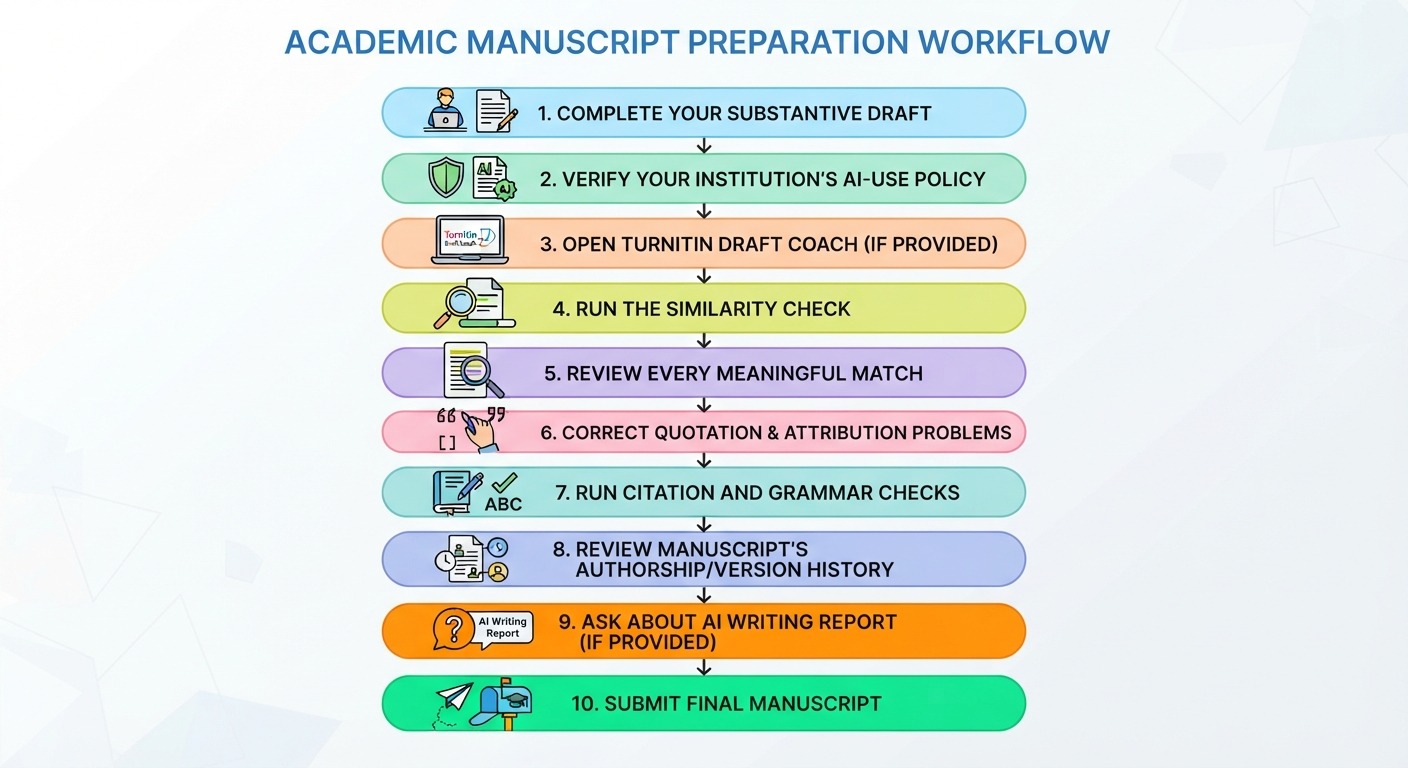
This approach is safer than trying to repeatedly upload a paper simply to obtain a preferred percentage.
What If Turnitin Flags Writing You Wrote Yourself?
Do not panic.
AI detection systems can produce false positives. Turnitin acknowledges this explicitly and states that AI detection should not be treated as definitive proof of AI use.
Turnitin has also reported that false-positive risk is higher in lower AI-detection ranges, which is one reason its current reporting approach does not surface a numerical score for the 1–19% range.
If legitimately authored text is flagged:
- Preserve your earlier drafts.
- Preserve your research notes.
- Preserve version history.
- Identify the highlighted passages.
- Explain your writing and revision process if asked.
- Follow your institution’s academic-integrity procedure.
- Do not rewrite passages solely to manipulate the detector.
The goal is to demonstrate authentic scholarly work, not to “beat” an algorithm.
How ManuscriptLab Can Help Before Submission
A professional manuscript review should focus on quality, clarity, consistency, and publication readiness, rather than promising a particular AI-detection score.
ManuscriptLab’s professional editing and formatting services can help authors strengthen academic language, consistency, structure, formatting, and presentation before submission.
For researchers preparing journal manuscripts, a final editorial audit can examine:
- Academic tone
- Logical flow
- Grammar and syntax
- Terminology consistency
- Citation presentation
- Reference formatting
- Tables and figures
- Journal formatting requirements
- Reporting-guideline alignment
- Submission-readiness issues
The distinction matters: professional editing improves the manuscript; it does not guarantee a particular Turnitin AI result.
Frequently Asked Questions
Can I check my paper on Turnitin for AI content before turning it in?
Possibly. Your access depends on your institution’s Turnitin configuration. Draft Coach provides students with pre-submission Similarity, Citation, and Grammar tools, while access to AI Writing Detection depends on the relevant Turnitin product and licensing.
How does Turnitin Draft Coach work for pre-submission checks?
Draft Coach operates inside supported Google Docs or Microsoft Word Online workflows and provides formative feedback while you write. Its documented student tools include Similarity Check, Citation Check, and Grammar Guide.
Can Draft Coach give me the same AI report my instructor sees?
Not necessarily. Draft Coach and the instructor-facing AI Writing Report are different parts of Turnitin’s product ecosystem. Your institution must have the appropriate AI-detection functionality enabled for the relevant report to be available.
What happens if I resubmit my draft multiple times?
The answer depends on whether you are using Draft Coach or an instructor-controlled Turnitin assignment. Draft Coach currently provides three Similarity Reports for a draft. Final-assignment resubmission behavior is controlled by the assignment configuration.
Can a low AI score prove that my paper is human-written?
No. An AI detector result is not proof of authorship. Turnitin describes AI detection as a signal that should be interpreted alongside other evidence and professional judgment.
Should I use an AI “humanizer” if Turnitin flags my paper?
No. If you wrote the paper yourself, preserve evidence of your authorship and follow your institution’s process. If AI use is permitted, follow the disclosure and attribution requirements established by your institution or publisher.
Pre-Submission Turnitin Checklist
Before you submit, verify the following:
- I have read my institution’s AI-use policy.
- I know whether Turnitin Draft Coach is available to me.
- I have run the available Similarity Check.
- I reviewed important similarity matches individually.
- I verified quotations and paraphrases.
- Every borrowed idea has appropriate attribution.
- Citations correspond correctly to references.
- I checked the manuscript’s grammar and formatting.
- I understand that Similarity and AI Writing reports measure different things.
- I know whether my institution provides student access to AI Writing Detection.
- I have preserved drafts and version history.
- I have not used AI-paraphrasing or “humanizer” tools to manipulate detection.
- My final manuscript follows the instructor’s or journal’s submission requirements.
Conclusion
Getting a Turnitin AI detection report before submission is not a universally available student feature. The most reliable approach is to determine what your institution has licensed, use Turnitin Draft Coach where available, distinguish Similarity Reports from AI Writing Reports, and follow your institution’s AI-use policy.
Most importantly, do not treat an AI percentage as a definitive judgment about authorship. Turnitin itself emphasizes that AI detection is a signal that requires context and human judgment.
For researchers and authors, the strongest protection is a transparent scholarly workflow: retain drafts, document your research process, cite sources correctly, disclose AI use when required, and submit a manuscript that meets the target publication’s technical and ethical standards.
Need a final academic-quality review before submission? Work with ManuscriptLab’s professional editing and formatting team to strengthen your manuscript before it reaches the reviewer, editor, or instructor.